.png)



Temp Mail API: Complete Guide to Free Disposable Email API Integration
A Temp Mail API enables developers to create and manage temporary email addresses programmatically. Instead of relying on permanent inboxes, applications can generate disposable email addresses for testing, verification, automation, and privacy-focused workflows.
Whether you're building a QA automation platform, SaaS application, or development tool, integrating a temp email API can simplify email testing while reducing spam and protecting user privacy.
What Is a Temp Mail API?
A Temp Mail API is a web service that lets applications generate temporary email addresses and access incoming messages through API requests.
Unlike traditional email services, disposable email addresses are designed for short-term use and automatically expire after a defined period.
Typical API capabilities include:
-
Generate disposable email addresses
-
Read incoming emails
-
Retrieve verification codes
-
Delete temporary inboxes
-
Manage multiple inboxes
-
Configure expiration times
How Does a Temp Email API Work?
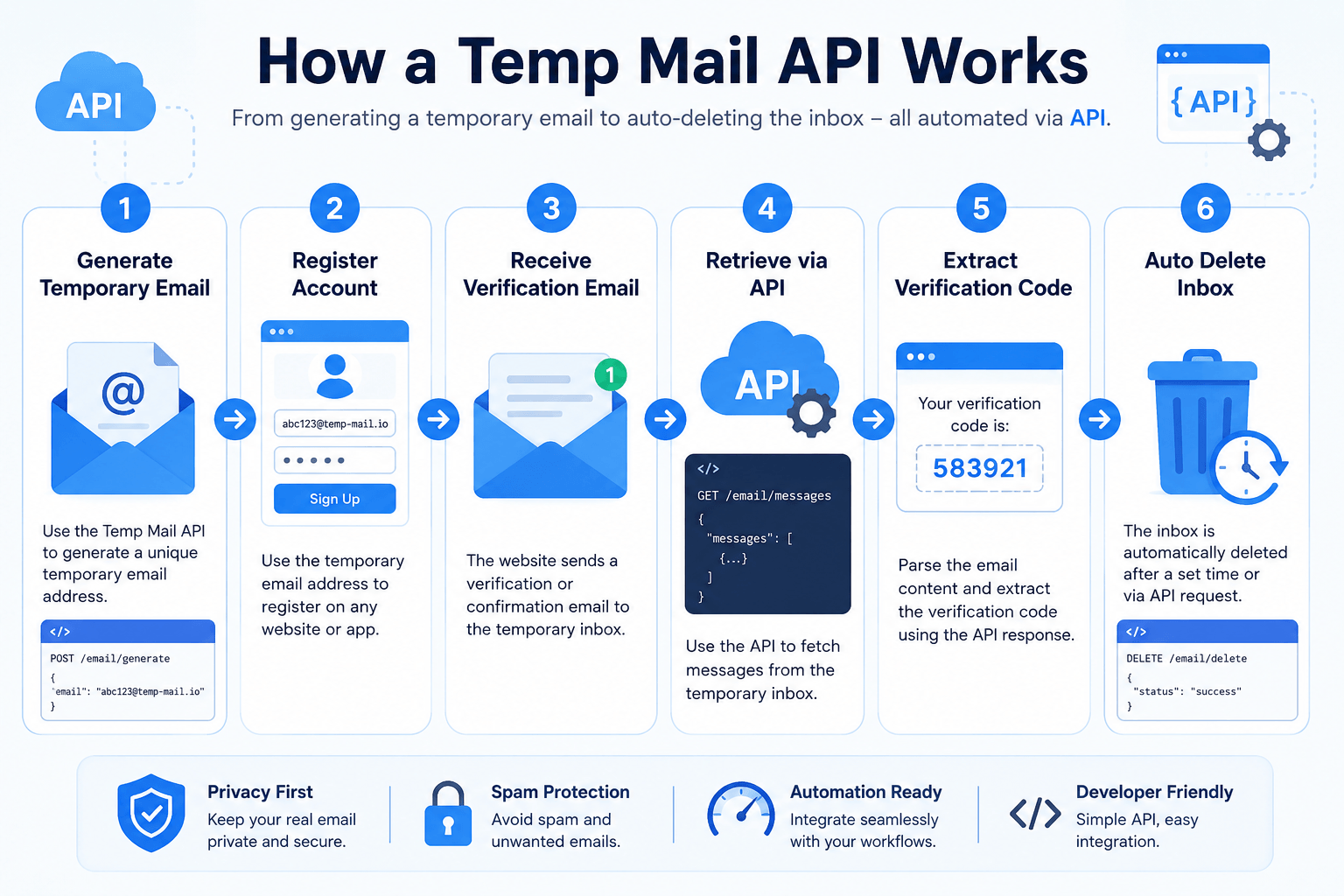
The process is straightforward:
-
Your application sends an API request.
-
The API generates a temporary email address.
-
The email address receives incoming messages.
-
Your application retrieves messages through API endpoints.
-
The temporary inbox expires automatically after its configured lifetime.
This workflow is ideal for automated testing and development environments.
Benefits of Using a Temp Mail API 🚀
Faster Software Testing
Developers can automatically create inboxes during testing without manually registering email accounts.
Better Privacy
Temporary email addresses prevent exposing personal or business email accounts during testing.
Spam Prevention
Disposable inboxes reduce unwanted marketing emails and automated spam.
Automation Friendly
Modern APIs integrate easily into CI/CD pipelines and automated testing frameworks.
Easy Integration
Most providers offer REST APIs with JSON responses that are simple to implement.
Common Use Cases
A disposable email API is useful in many scenarios:
-
Automated QA testing
-
User registration testing
-
Email verification testing
-
Continuous Integration pipelines
-
SaaS development
-
API testing
-
Demo environments
-
Development sandboxes
-
Security research
-
Privacy-focused applications
Temp Mail API Free vs Paid Services
| Feature | Free API | Paid API |
|---|---|---|
| Disposable inboxes | ✅ | ✅ |
| API access | Limited | Full |
| Rate limits | Lower | Higher |
| Custom domains | ❌ | ✅ |
| SLA | ❌ | ✅ |
| Premium support | ❌ | ✅ |
| Higher throughput | ❌ | ✅ |
Free APIs are suitable for small projects, while paid services are generally better for production workloads.
Key Features to Look For
When choosing a temp mail api free provider, consider:
-
REST API
-
HTTPS encryption
-
JSON responses
-
Inbox management
-
Email attachments
-
Webhooks
-
High uptime
-
Fast delivery
-
Multiple domains
-
API authentication
-
Rate limit information
-
Good documentation
Example Workflow
A common implementation looks like this:
-
Request a temporary email.
-
Register a new user with that email.
-
Wait for the verification email.
-
Retrieve the email via the API.
-
Extract the verification link or code.
-
Complete the verification automatically.
This approach saves time and reduces manual effort.
Security Best Practices 🔒
When integrating a disposable email API:
-
Always use HTTPS.
-
Protect API keys.
-
Rotate credentials regularly.
-
Respect provider rate limits.
-
Avoid storing temporary emails unnecessarily.
-
Monitor API usage.
-
Handle expired inboxes gracefully.
-
Validate API responses before processing.
API Integration Tips
To improve reliability:
-
Cache API responses where appropriate.
-
Retry failed requests with exponential backoff.
-
Log errors for debugging.
-
Monitor response times.
-
Handle timeout scenarios.
-
Use asynchronous processing for high-volume applications.
SEO Benefits for SaaS Platforms
Many SaaS companies use temporary email APIs during development to:
-
Test signup flows
-
Validate transactional emails
-
Improve CI/CD automation
-
Reduce manual QA
-
Speed up releases
A reliable testing workflow ultimately contributes to a better user experience.
Frequently Asked Questions
Is a Temp Mail API free?
Many providers offer free plans with limited requests. Premium plans typically provide higher limits and additional features.
Is a disposable email API secure?
It can be secure when used over HTTPS with proper API authentication and key management.
Can I automate email verification?
Yes. Developers commonly use temp mail APIs to automate account verification during testing.
How long do temporary emails last?
The lifespan depends on the provider. Some expire after minutes, while others remain active longer.
Can I receive attachments?
Some APIs support attachments, while others only provide plain text or HTML email content.
Is a temp email API suitable for production?
It is generally intended for testing, development, automation, and privacy-related use cases rather than end-user communication.
Conclusion
A Temp Mail API is a valuable tool for developers who need to automate email workflows, improve software testing, and protect privacy. Whether you're evaluating a temp mail api free option or implementing a more advanced disposable email API, choosing a service with reliable documentation, strong security, and appropriate rate limits will help ensure smooth integration.
By following best practices and selecting features that align with your application's needs, you can build efficient testing workflows while reducing manual effort and improving development productivity.